


Fifth Third: 53 Mobile Banking
4.734.95K Reviews
App Specs
- Version
- 5.26.0
- Updated On
- License
- Free
- Downloads
- 1,000,000+
- Developer
- Fifth Third Bank
- Categories
- Finance
- Platform
- Android, iOS
Screenshots
 Analysis by AppCompare
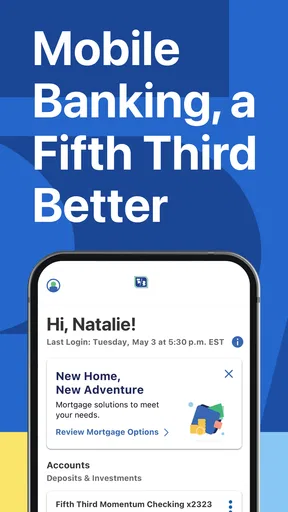
Managing a bank account from a phone is convenient, but convenience only matters when I can still see what is happening and make sensible choices. That is the standard I used with Fifth Third: 53 Mobile Banking, the finance app from Fifth Third Bank. It is free, available to Everyone, and built around the simple idea that banking should remain accessible when I am away from a branch.
My overall impression is practical rather than flashy. This is the kind of app I would consider when I already bank with Fifth Third and want a mobile way to stay connected to that relationship. It is less compelling as a general-purpose money-management tool for someone who wants to combine several banks, analyze spending across accounts, or compare financial products in one place.
What the app feels like in everyday banking
The app has been available since November 16, 2011, and its current version is 5.26.0, with a minimum operating-system requirement of iOS 9 or later. Those details matter because a banking app needs to fit into ordinary routines, not just look good in a demonstration. I would use it for the quick moments that otherwise create unnecessary friction: checking whether a deposit arrived, confirming that a payment cleared, or reviewing an unfamiliar transaction before deciding what to do next.
Fifth Third: 53 Mobile Banking has a 4.6 average from around 217 thousand ratings, with more than 35 thousand written reviews and over one million installs. That level of use suggests that the app is not an obscure companion product. Still, popularity is not the same as suitability. A person who does not use Fifth Third Bank will naturally get less value from it, while an existing customer has a clear reason to keep it installed.
The store summary, “If your phone is on, your bank is open,” captures the basic appeal without telling the whole story. Mobile access is useful when I need information outside branch hours, but I do not treat a phone screen as a replacement for careful account review. The strongest habit is to open the app with a specific purpose, check the relevant account activity, and close it once I have confirmed what I needed.
Trust starts with the account relationship
For a financial app, trust is not created by bright colors or a short slogan. I look for a clear connection between the app, the bank behind it, and the actions I am taking. Here, the developer is Fifth Third Bank, which gives the product a direct identity instead of making me wonder whether I am dealing with an unrelated budgeting service or an unofficial account viewer.
That distinction is important during sensitive moments. If I receive a message about a payment, notice a balance change, or need to review an account while traveling, I want to open the banking app I recognize rather than follow a link from an unexpected message. I would also check the app’s identity in the official app marketplace before installing it, especially if several results look similar.
Worth Reading Before You Choose

EA SPORTS FC Mobile 26 Is a Bigger Football Game, but It Takes Time

Flipboard Shows What News Apps Must Do Beyond the Feed

Switching to Android Auto Means Rethinking Your Driving Routine

Google Calendar Makes a Crowded Week Easier to Manage

Ludo King Makes the Most of the Minutes Between Plans

Baby Panda World Brings Quick Play to Modern Phones, but Its Game Library Feels Busy
I would not judge the app solely by its rating. Reviews can reveal patterns, but they can also reflect temporary outages, individual account problems, or expectations that do not apply to everyone. My more useful test is whether the app lets me inspect activity clearly and whether I can tell which account or transaction I am viewing before taking action.
Controls are most useful when I slow down
A mobile banking app can make routine actions feel almost automatic, and that is where I think caution is necessary. Before confirming anything, I would read the account name, amount, recipient or payee information, and any available timing details. A fast interface is helpful, but speed should never replace verification.
One practical workflow is to use the app as a confirmation layer rather than as a place to make impulsive decisions. If I am expecting a transfer, I first check the balance and recent activity. If the expected change is not visible, I avoid repeating the action immediately. That pause can prevent duplicate payments or confusion caused by assuming that a transaction failed simply because it has not appeared yet.
I also prefer reviewing transactions in a quiet setting instead of while standing in a checkout line. A crowded public place creates two problems: I can make a mistake, and someone nearby may see sensitive information. The app is designed for mobile access, but mobile access does not mean every environment is equally appropriate for financial tasks.
Another useful habit is separating observation from action. I might open the app only to check whether a charge posted. If I then decide to move money or make a payment, I take a second look at the details before continuing. This small change makes the phone feel less like an automatic button and more like a controlled banking workspace.
How I handle data-sensitive moments
Banking apps naturally involve sensitive information, so I pay attention to the moments when that information is visible or when the app asks me to continue. I avoid leaving the account screen open when handing my phone to somebody else, and I do not take screenshots of balances or transaction details unless I have a specific reason and a safe place to store them.
I would also review the app’s current permission and privacy choices on my device rather than assuming that every setting is permanent. Operating systems can change how permissions are presented, and users sometimes approve prompts quickly without reading them. My preference is to allow only what makes sense for the way I use the app, then revisit those choices after an update.
The same caution applies to notifications. A notification can be useful when it helps me notice account activity, but a lock-screen preview may expose more detail than I want visible. I would adjust the phone’s notification display so that sensitive text is not shown openly if other people could see the screen. That is not a criticism unique to this app; it is a sensible trade-off for any banking service accessed from a personal phone.
I am also careful with public networks. If I need to check an account urgently while away from home, I prefer a connection I trust and avoid entering financial information on a device I do not control. The app can make banking available in more places, but it cannot remove the risks created by an exposed screen, a shared device, or a questionable connection.
Where the app gives me agency
The biggest benefit of a bank-specific app is that it keeps account awareness close to the actions that matter. Instead of waiting for a statement or calling a branch for every basic question, I can look at the account when a question occurs. That immediacy helps me identify mistakes sooner and makes it easier to maintain a regular checking habit.
I find this especially useful for small, recurring checks. On a normal day, I might confirm that a routine payment has posted and that the remaining balance looks reasonable. Before a weekend trip, I might review recent activity so that an unfamiliar charge does not surprise me later. After shopping online, I might check whether the transaction appears as expected. These are modest tasks, but they reduce uncertainty.
The app is also useful for people who dislike phone calls for simple account questions. A mobile view can be less stressful than navigating a telephone menu when I only need to inspect activity. On the other hand, a screen cannot always replace personal support for complicated disputes, unusual account restrictions, or questions that require a detailed explanation. I would use the app to gather facts first, then contact the bank when the issue goes beyond a straightforward review.
That boundary is important. I would not assume that seeing a transaction means I understand its final status, and I would not treat a displayed balance as permission to spend without considering pending activity or other commitments. The app improves visibility; it does not eliminate the need for judgment.
A realistic day with Fifth Third
Imagine I am leaving for work and want to know whether a scheduled payment has cleared. I open the app, select the relevant account, and review the recent activity instead of relying on memory. If the transaction appears, I can move on. If it does not, I avoid immediately submitting another payment and investigate the timing through the bank’s available support channels.
Later, I notice a purchase I do not recognize. My first step is to check the transaction details carefully and consider whether it could be a delayed posting, a subscription, or a purchase made by someone authorized to use the account. If it still looks wrong, I document what I see and contact Fifth Third through an official route. The app is valuable here because it gives me an early signal, but the responsible response is not to guess.
At the end of the day, I might check the account once more and then sign out or lock the phone, depending on how I normally secure it. I would not keep the app open in the background as a substitute for account awareness. A short, intentional review is more useful than repeatedly refreshing without a reason.
Who should choose it, and who should look elsewhere
I think this app makes the most sense for an existing Fifth Third customer who wants direct mobile access to banking information and routine account tasks. It is also a reasonable fit for someone who values a bank-specific experience over a separate budgeting dashboard. The free price removes a subscription decision, which makes trying it straightforward for eligible customers.
I would be more cautious about choosing it as my main tool if I use several banks and want one consolidated picture of spending. A dedicated budgeting service may be better for comparing categories across institutions, while a desktop banking session may be preferable for long forms, extensive document review, or complicated financial planning. Those alternatives are not necessarily safer; they simply serve different jobs.
I would also skip relying on it alone if I rarely use mobile devices, have an older phone that no longer receives dependable system updates, or prefer handling sensitive matters with a person. The minimum operating-system requirement is modest, but compatibility is only one part of the decision. I still want a device that I can secure, update, and keep under my control.
My cautious verdict
Fifth Third: 53 Mobile Banking is a sensible finance app when the goal is direct, everyday access to a Fifth Third Bank relationship. I like it most as a tool for checking activity, confirming expected changes, and noticing problems early. Its value comes from making those checks available without requiring a branch visit or a phone call for every basic question.
My recommendation comes with a clear condition: use the convenience deliberately. Read transaction details before acting, review device permissions and notification visibility, avoid exposing account screens in public, and contact the bank when an issue needs more than a quick glance. The app gives me better visibility, but I remain responsible for deciding what deserves action.
With that mindset, the app is a practical choice for Fifth Third customers who want banking within reach throughout the day. It is not the right answer for every financial workflow, especially if I need multi-bank analysis or extensive planning tools. For its narrower purpose, though, the free mobile experience is useful, familiar, and easy to justify.
Fifth Third: 53 Mobile Banking is rated for Everyone, and its large installed base makes it a well-established option in the mobile finance category. I would choose it for account awareness and routine control, not because a phone can replace every form of banking support. That distinction is what makes my recommendation cautious but positive.
Pros
- Secure biometric login makes account access quick and convenient.
- Mobile check deposit saves trips to a branch or ATM.
- Bill pay and transfers are easy to manage from one dashboard.
- Card controls help lock cards and manage spending preferences.
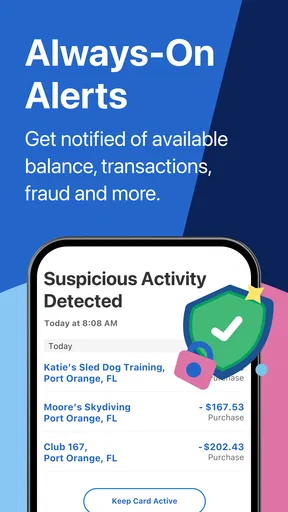
- Account alerts can help track balances and detect unusual activity.
Cons
- Some features may require an eligible Fifth Third account or card.
- Mobile deposit limits can vary by account and customer history.
- The app depends on reliable internet and may not work offline.
- Certain transactions or services may involve bank fees.
- Support and branch services are limited outside Fifth Third’s service area.
FAQs for Fifth Third: 53 Mobile Banking
What can you do with Fifth Third: 53 Mobile Banking?
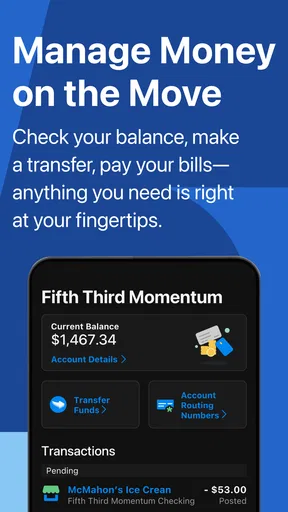
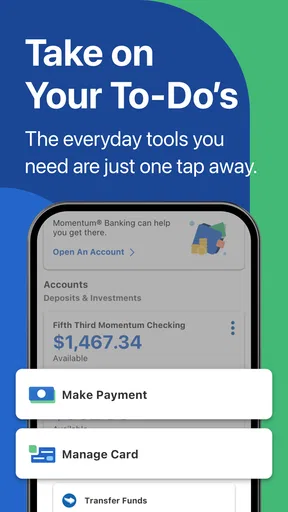
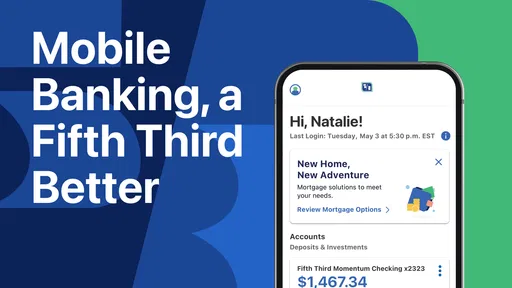
Fifth Third: 53 Mobile Banking lets eligible Fifth Third customers manage many everyday banking tasks from an Android or iOS device. After signing in, you can review balances and transaction history, transfer money between accounts, pay bills, deposit eligible checks, locate branches or ATMs, and manage certain card settings. Available features may vary depending on your account type, device, location, and Fifth Third’s current service availability.
Is Fifth Third: 53 Mobile Banking safe to use?
The app is designed with standard banking security measures, including secure sign-in, encryption, and account monitoring features. Depending on your setup, Fifth Third may also support biometric authentication, such as fingerprint or facial recognition, and verification alerts for suspicious activity. For safer use, download the app only from an official app store, keep your phone updated, avoid public Wi-Fi for sensitive transactions, and never share your login or verification codes.
Can I deposit checks using the Fifth Third mobile app?
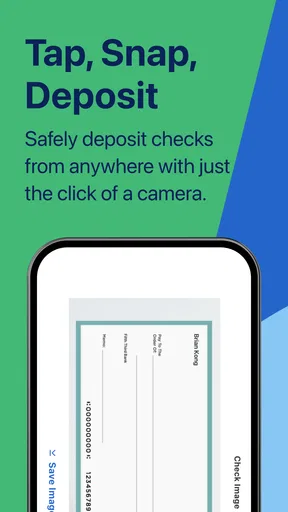
Yes, the app generally supports mobile check deposit for eligible Fifth Third accounts. You typically photograph the front and back of the endorsed check, enter the amount, select the receiving account, and submit the deposit for review. Make sure the images are clear and that the endorsement follows Fifth Third’s instructions. Deposit limits, availability times, holds, and eligibility can differ by customer and account.
Does Fifth Third: 53 Mobile Banking charge fees?
Downloading the Fifth Third: 53 Mobile Banking app is generally free, but using the app does not automatically eliminate normal banking charges. Depending on your account and transaction, fees could apply to services such as overdrafts, certain transfers, expedited payments, or using an out-of-network ATM. Your mobile carrier may also charge data fees. Review Fifth Third’s current fee schedule and your account terms before using paid services.
What should I do if the app will not let me sign in?
If sign-in fails, first confirm that your internet connection is working and that you are using the latest version of the app. Check your username and password carefully, and use the official recovery options rather than repeatedly guessing credentials, since multiple failed attempts may temporarily lock access. If verification messages do not arrive, confirm your contact details and phone service. For persistent problems, contact Fifth Third through an official support channel.


